Total Pageviews

Saturday, 21 December 2013

Digital Logic Simulator

Digital circuit design has provided the modern world with a multitude of useful products. Computers, calculators, audio and video equipment, robotics, medical tools and an unending source of toys and gadgets are continuously being generated with no apparent end in sight. But the technology behind modern electronic equipment is rather inscrutable to most individuals, and students are fortunate if they complete their schooling with a decent grasp of standard math and science, much less a basic grasp of modern technology. Funding for the kind of equipment required to allow students to build and test actual electronic circuits is simply beyond many school systems. This provides exactly the kind of problem best solved by simulation.

 Multimedia Logic software, a drag and drop logic design software.


       Figure 1 : White canvas of the Multimedia Logic software.This canvas can help you in designing/drawing your logic circuit.


Figure 2 : This is the palette provide as your references to choose which component is needed to construct your circuit.


LET'S LEARN HOW TO USE THIS SOFTWARE...

Step 1


Choose the logic AND in the palette,click and place it on the canvas as shown in the below figure.


Step 2


Choose switch icon in the palette.Do the same method as mention above(click,place on the canvas).You may adjust/arrange the position of the component as you like by choose the selector icon. The result shown below.

  
* the switch is use to test the truth table.
* switch flipped up 1(on) , switch flipped down (off) 

Step 3


Proceed with the next step, choose LED icon and as usual , place it on the canvas.Place the LED on the output side of the AND gate.


Step 4


Next, choose the wire icon. This wire icon use to connect each dot to the respective gate.All you need to do is just click at one end  and drag the line to the other end. Result as shown below.


Step 5


Once the circuit is done, you need to label it to ease you to recognise it.To insert a text, choose icon text in palette (shown by capital A).Click and place it at each component in your circuit.


To edit the text , click the selector icon (the arrow icon) on the palette. Then , double click the Text on the canvas and a command box of text properties will appear as below.Type the suitable word for your input and output on the Text box. Then click OK.


Step 6


Both switch is in 0 state.If you want to change the state or in other word, you want to flipped up the switch , double click the switch in the circuit on the canvas. The switch properties box will appear.Click on at the initial state and click OK.


Then, on the menu bar, click Simulate menu and choose Run.


Test the AND truth table by clicking the switch to see whether LED will light on. LED will light up when all condition are met.


As you can see the LED is not light up.This is because not all the condition need to light up the LED are met.


In this case(logic circuit), both switches must be on.So , all you need to do is just flipped up the B switch as above. Again Run the circuit to see whether the LED will light up or not.


See, finally the LED light up and it shows that all the condition (based on the truth table) are met. To stop the simulation, just press the Stop button.
You also can save this circuit into .Igi file format or print it out  by using the file menu.


SEE,HOW SIMPLE IT IS TO BUILD A LOGIC CIRCUIT BY USING THIS SOFTWARE. SO, LET'S MAKE THING EASY....


prepared by : nurul izzati nor rusham (B 031310238)


Saturday, 14 December 2013

CONT....ARITHMETIC FOR COMPUTER

THIS POST IS CONTINUITY FROM PREVIOUS POST....

BASIC BINARY NUMBER OPERATIONS

A binary number operation include addition, subtraction, multiplication and division. The fundamental explorations on computer binary number operations will be more exciting if we used and understanding the basic  of number calculation between human and computer. Come and lets learn how computer will do the calculation.


• ADDITION
• SUBTRACTION
• MULTIPLICATION
• DIVISION


Before doing the all operation we should know the RULES ….

BINARY ADDITION…
Here are the simple rules in binary addition ops….

 there are 4 rules that should be follow when doing this

                                                  TABLE 1-BINARY NUMBER OPERATION RULES
BINARY RULES
SUM
CARRY
0 + 0 = 0
0
0
0 + 1 = 1
1
0
1 + 0 = 1
1
0
1 + 1 = 1
0
1


EXAMPLE:  BY USING FOURTH RULES…
                                                                         
                                                                CARRY                  1    1
                                                                                                0     1      1
                                                                                          +    0     0      1
                                                                                                1     0      0   SUM 


BINARY SUBTRACTION…         
Let’s  proceed with another 4 rules in  binary subtraction ops….

TABLE 2- BINARY NUMBER OPERATION RULES
BINARY RULES
SUM
BORROW
0 – 0 = 0
0
0
0 – 1 = 1
1
10
1 – 0 = 1
1
0
1 – 1 = 1
0
1

EXAMPLE:
      a)      11 – 10                                        

     solution;                                                   

                1 1                                                         
-   0 1
                1 0

      b)    101 – 011
solution;

(left column : when a 1 is borrowed , a 0 is left , so 0-0=0)
0            1 (middle column: borrow 1 from next column to the left , making a 10 in this column,then 10-1=1 )
                   1         0        1
                -  0         1        1
                   0         1        0

BINARY MULTIPLICATION…

Next, 4 rules that should be follow when doing binary multiplication ops…

TABLE 3 – BINARY NUMBER OPERATIONS RULES

BINARY RULES
MULTIPLY
0 X 0 = 0
0
0 X 1 = 1
0
1 X 0 = 1
0
1 X 1 = 1
1

EXAMPLE : Multiply the binary numbers 1010 and 1001


        1010
             x 1001
                1010
              0000
            0000
          1010        
          1011010


BINARY DIVISION...

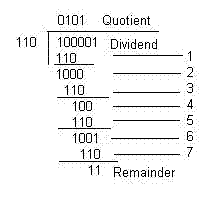
For your information , binary division follow the same rule as binary multiplication


HEXADECIMAL NUMBER OPERATION...

1) Hexadecimal Addition
2) Hexadecimal Subtraction

let me show what is hexadecimal addition ops is...


In hexadecimal addition , if the sum number is greater than 1510 ,  the amount of the sum that exceeds 1610 will carry a 1 to the next column….


Example: 


a) 5816 + 2216                                    b)  2 B16 + 8416                            c)  DF16 + AC16


solution :

a)  
           5       816
       +  2       216
           7     1016     = 7A16            


b)
           2        B16
       +  8        416 
              10      1516      =  AF16


c)                                                       D           F
                                                                            +     A            C
                        1310   +   1010    +   110   =  2410         1510     +    1210     =    2710
                                          2410    -   1610   =  810            2710      -    1610    =   1110
                                                                          =  810                                                 =    B10  (with a 1 carry)
                                                          (with a 1 carry)               


answer :  18B


prepared by: Nurul Izzati Nor Rusham (B031310238)


Tuesday, 10 December 2013

ARITHMETIC FOR COMPUTERS

The numeral system and arithmetic operations

Unlike the Egyptians, the mathematicians of the Old Babylonian period went far beyond the immediate challenges of their official accounting duties. For example, they introduced a versatile numeral system, which, like the modern system, exploited the notion of place value, and they developed computational methods that took advantage of this means of expressing numbers; they solved linear and quadratic problems by methods much like those now used in algebra; their success with the study of what are now called Pythagorean number triples was a remarkable feat in number theory. The scribes who made such discoveries must have believed mathematics to be worthy of study in its own right, not just as a practical tool.


So , here we are going to explain to you about number system.

NUMBER SYSTEM…
Introduction to number system
Number system is a basic symbol to represent a set of quantities .There are many types of number system but in this topic we are going to focus only on three number system, which are:
• binary,
• decimal and
• hexadecimal;                            


1.1  NUMBER  SYSTEM BASE…
1.1.a) What is a base for number system types ??
- Most of the numbering system will have a base.
- Base ~ maximum number that can be represented on the
               single digit or number.

TABLE 1-1: Types of Number system
SYSTEM
BASE
POSSIBLE DIGITS
Binary
2
0 1
Octal
8
0 1 2 3 4 5 6 7
Decimal
10
0 1 2 3 4 5 6 7 8 9
Hexadecimal
16
0 1 2 3 4 5 6 7 8 9 A B C D E F


Binary number

  • ·        Base 2.
  • ·        The number consist only two digit 0 and 1 only.
  • ·        The weight structure of binary number is :


Binary Points


2 n – 1  …   23     22     21     20      .     2-1     2 -2   …  2 - n

·        The least significance bit (LSB) and most significance bits (MSB) can be identified based on the size of binary number itself.


                                                            MSB              LSB                                      
     1000001110 


Decimal number

  • ·        Base of 10.
  • ·        Value of the assigned weight composed by 10 digits (0 – 9).
  • ·        Position weight structure  will determined the positive values and negative values.


 . . .   105     10 4     10 3      102      101     10 0                                             (positive value)
102    101     100     10-1     10-2     10-3    . . .                                     (negative value)


Hexadecimal number

  • ·        Base of 16.
  • ·        Value of the assigned weight composed by 16 digits (0 until F)
  • ·        The digits is suitable to present in fours bit number.


1.1  NUMBER  SYSTEM CONVERSION…


In this section, you will learn how number system (binary, decimal, hexadecimal) will be  convert. For your information, there are many ways or method that can be used to convert those number system. But in this blog, we will show what method that we used which exactly the systematic method to convert the number system. We are going to show how number system  is converted using repeated – division  by base 2, base 10, and base 16.


TABLE 1-2 : Number System Conversion
BINARY
DECIMAL
HEXADECIMAL
0000
0
0
0001
1
1
0010
2
2
0011
3
3
0100
4
4
0101
5
5
0110
6
6
0111
7
7
1000
8
8
1001
9
9
1010
10
A
1011
11
B
1100
12
C
1101
13
D
1110
14
E
1111
15
F


Example 1-1
Convert decimal number  51.3125  to binary number.
Weight
26
25
24
23
22
21
20
2-1
2-2
2-3
2-4
Value Represented
64
32
16
8
4
2
1
0.5
0.25
0.125
0.0625
Binary (*)
0
1
1
0
0
1
1
0
1
0
1

51 – 32 = 19

19 – 16 = 3

3 – 2 = 1

1 - 1 = 0

0.3125 – 0.25 = 0.0625
0.0625 – 0.0625 = 0

     Therefore, the conversion of   51.312510 = 110011.01012


or, you may try this method too.


    A systematic method for number conversion

Example 1-2


2
51

2
25
1

2
12
1

2
6
0

2
3
0

2
1
1


1
                                                                                                                                                                                             0.3125 x 2 = 0.625   0
                       0.625 x 2 = 1.25       1
                       0.25 x 2 = 0.5           0
                       0.5 x 2 = 1.0             1
                                                         
                       0.312510  = 0.01012                                                                                                                                                                                                (the answer should be read from top to bottom)                                                                                                                                                                  5110  = 1100112

(the answer should be read from bottom to top)    

                Therefore, the conversion of   51.312510 = 110011.01012          

prepared by: nurul izzati nor rusham (B031310238)